Mastering Springboot :1.3
Spring MVC Architecture Explained Tomcat, DispatcherServlet, Request Lifecycle & 3-Tier Architecture (with Diagrams)
How does a Web Server works in Spring Boot?
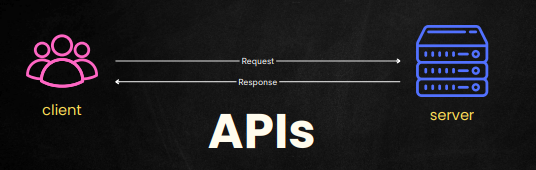
Introduction
When you write a Spring Boot REST API, you usually focus on:
Controllers
Services
Repositories
But have you ever stopped and asked:
Who receives the HTTP request first?
What role does Tomcat play?
How does Spring know which controller method to call?
Where does business logic belong?
How does data finally reach the database?
This blog will connect all the dots.
By the end of this article, you will clearly understand:
Spring MVC architecture
DispatcherServlet lifecycle
Complete request flow
3-tier architecture in Spring Boot
How Controller, Service, and Repository work together
Let’s start from the very beginning.
⭐ WHAT IS MVC ARCHITECTURE?
MVC = Model – View – Controller
An architectural pattern used in web applications.
Before diving into code, imagine this:
A user sends a request → the request travels through layers → data is processed → response comes back.
Spring MVC is simply a well-organized system that manages this journey
Imagine you go to a restaurant:
You (client) ask the waiter for "Paneer Butter Masala"
The waiter (Controller) takes your request to the kitchen
The kitchen (Model) prepares the food
Waiter brings prepared dish (View) back to you
This is EXACTLY how MVC works.
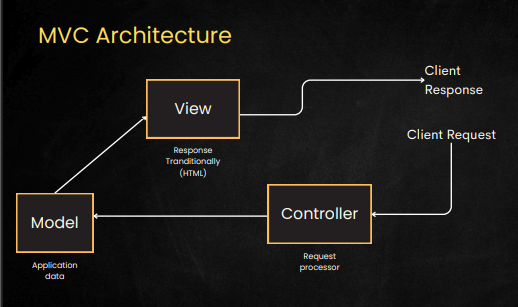
Spring MVC(Traditional Flow):
1️⃣ Controller — The Request Handler
Takes input from user →
/login,/productsDecides what needs to happen
Talks to Service
In Spring:
@Controller
public class ProductController {
    @GetMapping("/products")
    public String getProducts(Model model) { … }
}
2️⃣ Model — The Data
This contains:
Business data returned from database
Objects like User, Product, Order
Example:
Product product = new Product(1, "iPhone", 120000);
model.addAttribute("product", product);
The Model is passed to the view.
3️⃣ View — The Output (UI)
In traditional MVC → JSP / Thymeleaf page
Controller returns a view name
View Resolver finds the correct HTML page
Example:
return "products.html";
Rest MVC :
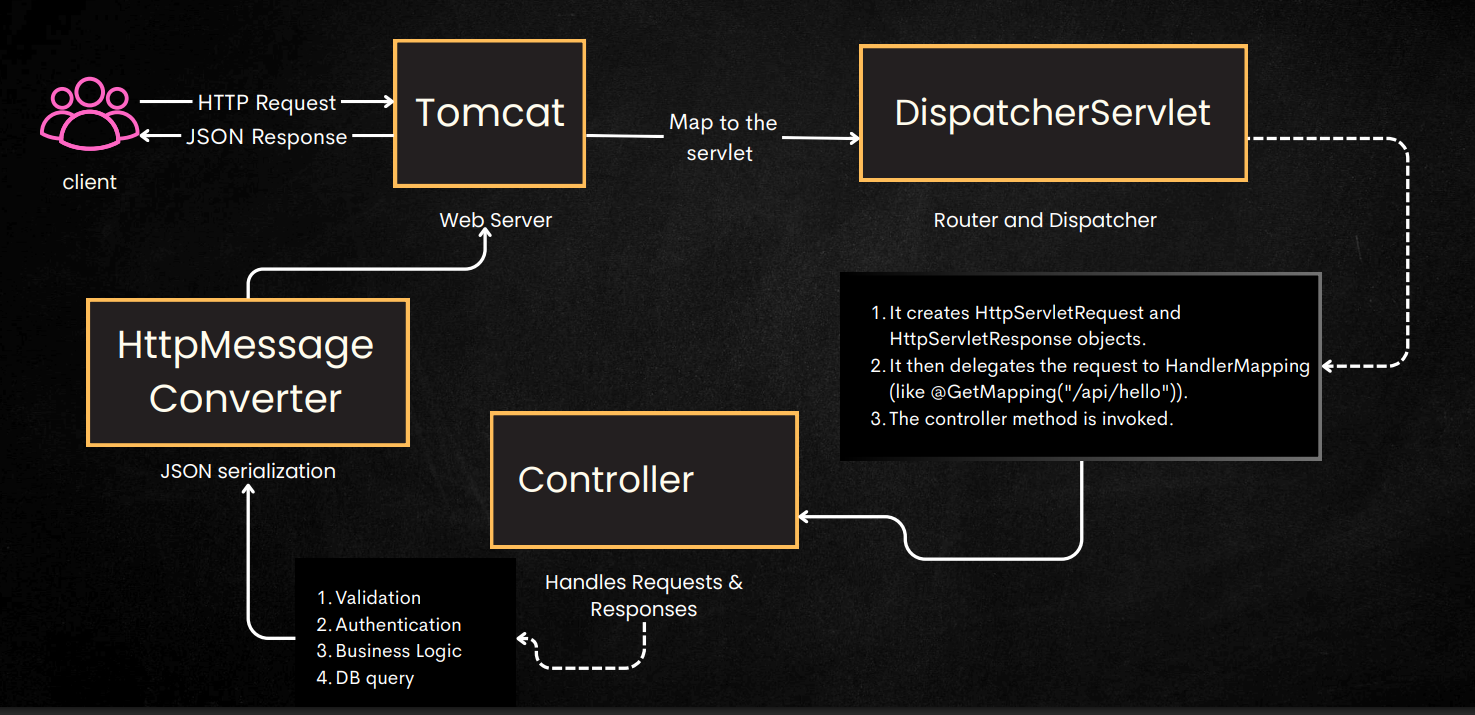
Now lets understand rest mvc flow :
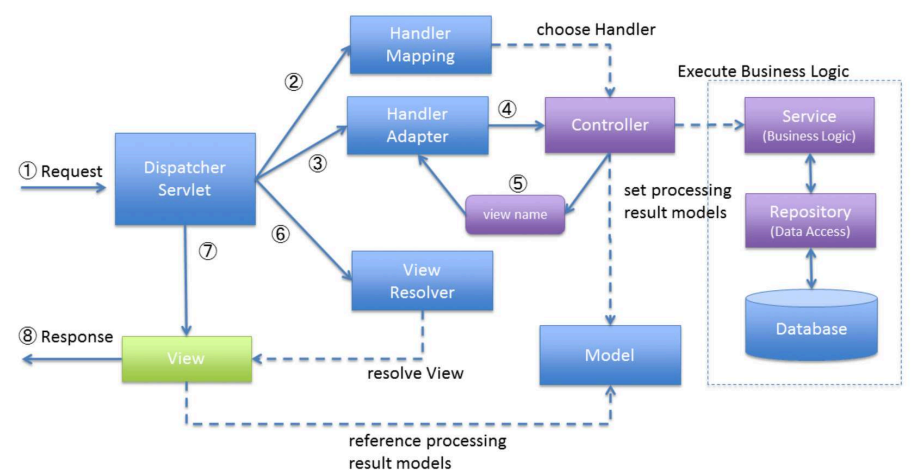
DispatcherServlet
DispatcherServlet =
The traffic police officer of Spring MVC.
Every request goes first to DispatcherServlet
DispatcherServlet decides where to send the request
It sends the request to the right controller method
After controller responds, it sends the response back to the user
It "dispatches" the request → that's why it's called DispatcherServlet.
Step-by-Step Request Flow via DispatcherServlet
① Client → Request
Example:
GET /api/products
Request enters the Spring app at DispatcherServlet.
② DispatcherServlet → HandlerMapping
DispatcherServlet asks:
“Which controller method handles this URL?”
HandlerMapping looks at:
@GetMapping@PostMapping@RequestMappingPath variables
and returns:
ProductController.getAllProducts()
③ DispatcherServlet → HandlerAdapter
DispatcherServlet asks:
“How do I call this method?”
HandlerAdapter:
Prepares method parameters
Prepares request object
Calls the controller method
④ Controller Executes
Controller calls:
Service
Repository
Database
Returns a Model or Java object
⑤ DispatcherServlet handles the Return Type
✔ In REST:
Controller returns Java object:
return new Product(1, "Phone");
DispatcherServlet → HttpMessageConverter → JSON
⑥ DispatcherServlet → Sends Response
Final response goes back to the client.
In short
| Component | Simple Meaning |
| DispatcherServlet | Traffic controller for all requests |
| HandlerMapping | Finds correct controller method |
| HandlerAdapter | Calls that controller method |
| Controller | Handles request |
| HttpMessageConverter | Converts Java → JSON |
🟥 REST MVC Flow via example
Let’s say a client calls:
GET /api/employees/1
Step 1️⃣ Request reaches Tomcat
Tomcat receives the HTTP request.
Step 2️⃣ Tomcat forwards request to DispatcherServlet
DispatcherServlet is registered automatically by Spring Boot.
Step 3️⃣ DispatcherServlet asks HandlerMapping
“Which controller method can handle this URL + HTTP method?”
Spring checks:
@RequestMapping@GetMapping@PostMapping, etc.
Step 4️⃣ Controller method is invoked
Correct method is called with:
@PathVariable@RequestBody@RequestParam
Step 5️⃣ Controller calls Service
Controller delegates business logic.
Step 6️⃣ Service calls Repository
Service interacts with database layer.
Step 7️⃣ Response flows back
Response → DispatcherServlet → Tomcat → Client
🏗️ 3-Tier Architecture in Spring Boot
Spring Boot applications are typically structured using 3-tier architecture.
Presentation Layer → Service Layer → Persistence Layer
Let’s understand each one.
🖥️ 1. Presentation Layer (Controller)
Client——controller ——-service———respository———actual database
DTO
Spring MVC provides an annotation-based programming model where @controller and @RestController components use annotations to express request mappings, request input ,exception handling and more
The @RestController annotation is a shorthand for @controller + @ResponseBody meaning all methods in the controller will return JSON /XML directly to the response body
Responsibility:
Handle HTTP requests
Validate input
Convert request → DTO
Call service layer
Return response
What Controller should NOT do:
❌ Business logic
❌ Database access
Request Mappings
You can use the @RequestMapping annotation to map requests to controllers methods. It has various attributes to match by URL , HTTP method, Request parameters,headers media types
Ex-Getmapping,postmapping,putmapping,patchmapping
Example Controller
@RestController
@RequestMapping("/api/employees")
public class EmployeeController {

    private final EmployeeService service;

    public EmployeeController(EmployeeService service) {
        this.service = service;
    }

    @GetMapping("/{id}")
    public EmployeeDto getEmployee(@PathVariable Long id) {
        return service.getEmployeeById(id);
    }

    @PostMapping
    public EmployeeDto createEmployee(@RequestBody CreateEmployeeDto dto) {
        return service.createEmployee(dto);
    }

    @PutMapping("/{id}")
    public EmployeeDto updateEmployee(
            @PathVariable Long id,
            @RequestBody UpdateEmployeeDto dto) {
        return service.updateEmployee(id, dto);
    }

    @DeleteMapping("/{id}")
    public void deleteEmployee(@PathVariable Long id) {
        service.deleteEmployee(id);
    }
}
Common Request Mappings
| HTTP Method | Annotation | Purpose |
| GET | @GetMapping | Fetch data |
| POST | @PostMapping | Create |
| PUT | @PutMapping | Full update |
| PATCH | @PatchMapping | Partial update |
| DELETE | @DeleteMapping | Remove |
@RequestBody
Converts JSON → DTO
Uses HttpMessageConverter (Jackson)
🧠 2. Service Layer (Business Logic)
Responsibility:
Business rules
Validation
Transactions
Orchestration of multiple repositories
DTO ↔ Entity conversion
Why Service Layer exists:
Keeps controllers thin
Keeps repositories clean
Central place for logic
Example Service
@Service
@Transactional
public class EmployeeService {

    private final EmployeeRepository repository;

    public EmployeeService(EmployeeRepository repository) {
        this.repository = repository;
    }

    public EmployeeDto getEmployeeById(Long id) {
        Employee emp = repository.findById(id)
                .orElseThrow(() -> new RuntimeException("Not found"));
        return EmployeeMapper.toDto(emp);
    }
}
🗄️ 3. Persistence Layer (JPA & Repository)
Responsibility:
Interact with database
Perform CRUD operations
No business logic
Entity – Mapping Java to Database
@Entity
@Table(name = "employees")
public class Employee {

    @Id
    @GeneratedValue
    private Long id;

    private String name;
    private String email;
}
@Entity tells JPA:
“This class represents a database table.”
Repository – Database Access
public interface EmployeeRepository
        extends JpaRepository<Employee, Long> {
}
Spring Data JPA:
Generates SQL automatically
Uses Hibernate internally
Returns Entity objects
💡 Why This Architecture Is Powerful
Clear separation of concerns
Highly testable
Easy to scale
Easy to debug
Clean and maintainable
🎯 Conclusion
Spring MVC is not magic — it is well-designed architecture.
Tomcat handles HTTP
DispatcherServlet coordinates everything
Controllers handle requests
Services handle business logic
Repositories handle data
Entities map Java to database